
 Azhagi Facebook Group

new_releases
Beta releases
In this page, you can find the current betas of both Azhagi and Azhagi+ (AzhagiPlus). If in case you need the earlier versions of Azhagi and Azhagi+, they too are available - at befs.php. Apart from beta version details, this page carries the 'Change Log' of Azhagi+ too.
Azhagi+ (AzhagiPlus) - Updated Versions
- Azhagi+ Updated Version 10.45 U4A (Released: 17th Nov, 2022) This is the current GPR (General Public Release) version of Azhagi+ which is presently available for download from the downloads page of Azhagi+.
- Few more XML and TXT files got added anew so that there are now 660 XML files and 50 transliteration/conversion TXT files in Azhagi+.
- One can now type in 714 'Language+Font+Keyboard' combos, of which 686 are for Tamil.
The corresponding portable version of the same is available at azhagi.com/portable and azhagi.com/portabletam, as usual.
- Azhagi+ Updated Version 10.45 U2A (Released: 10th May, 2021) This is the current GPR (General Public Release) version of Azhagi+ which is presently available for download from the downloads page of Azhagi+.
- One can now type in 100+ world languages using Azhagi+, availing the XML files ever so generously offered by Alec McAllister (formerly of the University of Leeds and now retired). Thanks a TON to Alec for his XML files.
- Very many new XML and TXT files got added anew so that there are now 658 XML files and 47 transliteration/conversion TXT files in Azhagi+.
- One can now type in 709 'Language+Font+Keyboard' combos, of which 683 are for Tamil.
- To know about the above (and few more changes) in full detail, please first see az-updates.php first.
- Then, see azhagi.com/alec, without fail.
The corresponding portable version of the same is available at azhagi.com/portable and azhagi.com/portabletam, as usual.
Azhagi+ (AzhagiPlus) - Beta Versions
- There are currently no beta versions available.
AzhagiPlus - Change History
-
This is the current GPR (General Public Release) version of Azhagi+ which is presently available for download from the home page of Azhagi+.
- Azhagi+ 10.45 (Released: 14th October, 2018)
- Updated on 9-Oct-2020. Please read this faceboook post - for details.
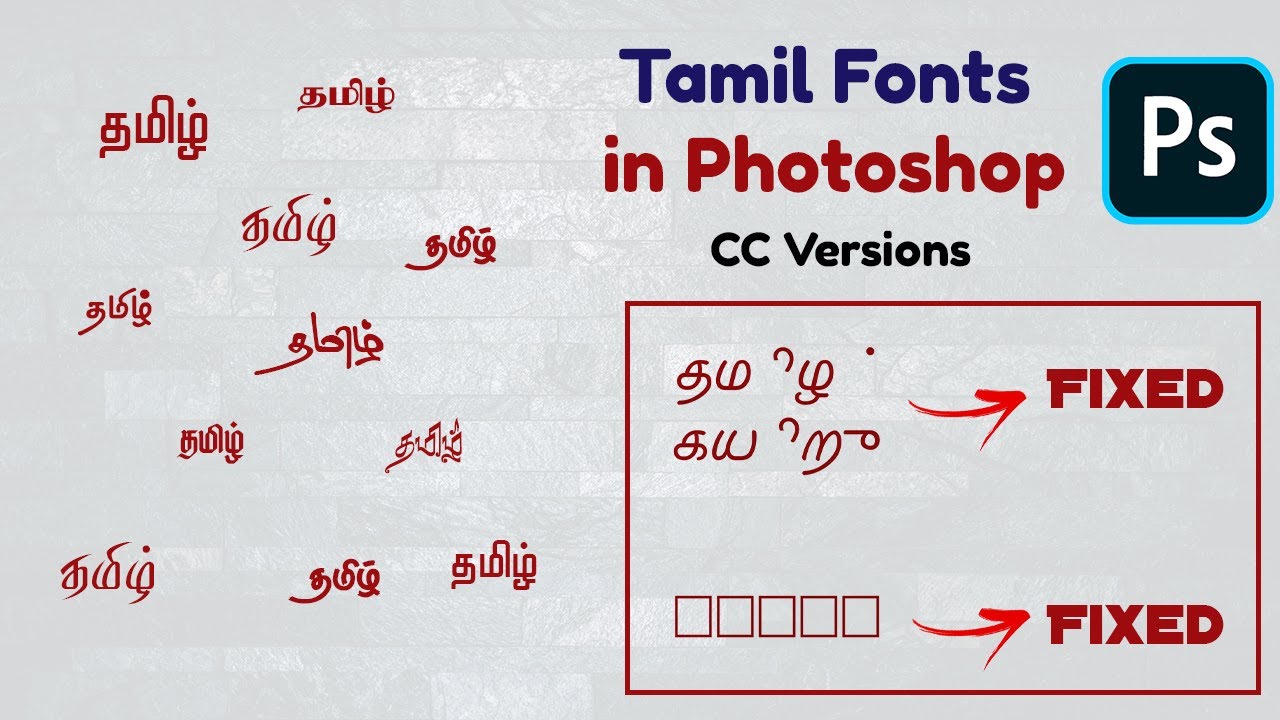
- For the FIRST time ever*, one can now type in Tamil in Adobe Photoshop CC/CS "using STMZH (Senthamizh) fonts" too. This has been made possible using the "newly" created 3 xml files and 1 text file for STMZH. Thus, one can seamlessly type in Tamil in Adobe Photoshop CC/CS in 4 different keyboard layouts - PhoneticTransliteration, UserDefinedPhonetics, TamilNet99 and TamilTypewriterOld. While intending to type in Photoshop CS/CC, the following steps have to be followed:
- Select 'Stmzh_P' (and not 'Stmzh') under 'Font Encoding' in Azhagi's first opening screen.
- Under 'Keyboard Layout', select any of the 4 keyboard layouts - PhoneticTransliteration or UserDefinedPhonetics1 or TamilNet99 or TamilTypewriterOld.
- Choose 'East Asian' under 'Text Engine Options' after clicking on 'Edit->Preferences->Type...' menu item of Photoshop CS/CC.
- Therafter, in a new text area of Photoshop CS/CC, set the font to one of the STMZH fonts, then press the global hotkey (which is 'F10' by default) to seamlessly type in Tamil in all STMZH fonts.
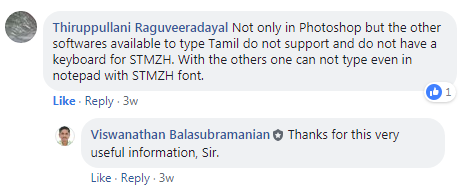
NOTE: As far as I know, other than Azhagi+, there is no other* typing software available, as of now, to help one type seamlessly in Tamil in Adobe Photoshop CC "using STMZH fonts". Users have confirmed this. For instance, please read this comment in Azhagi's Facebook Group. Screenshot of the same hereunder.
(*) I have repeatedly mentioned about the 'first-time' nature of this newly introduced facility for the only reason that the awareness of this vital information [that IT IS POSSIBLE to type in Photoshop CS/CC in STMZH Tamil fonts] spreads as much as possible and thus the society gets benefited immensely.
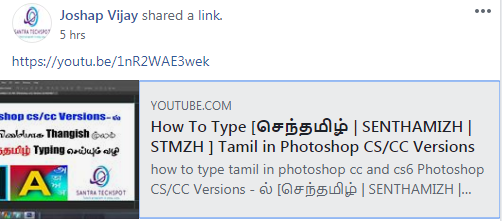
And, I take this opportunity to profoundly and profusely thank Mr. Joshap Vijay who promptly put up a YouTube Video Demo to showcase the above first-of-its-kind facility. - Apart from the above video, for further more confirmation that the above facility works 100% in all the operating systems, please see the following testimonials. I am placing these too hereunder so that users need not have any doubt# over the above facility. Let them be aware that in case the above facility is not working in their system, it is only because of them not following the instructions in the above-mentioned video correctly. For any doubts, users can always post their queries at any time at Azhagi's Facebook Group or as a comment in Mr. Vijay's above-mentioned video. I and/or Vijay shall definitely help you out. (#) There is a possibility of some users instantly doubting (even before trying) as to whether the above facility will work. This is because a facility such as the above not available since years together. Hence, some users, having tried so many methods in the past without success, might start doubting whether the above facility would work as promised.
- As a 'first of its kind' facility (as far as I know), those interested can use Azhagi+ to type around 100 Vedic/Devanagari extended characters, while typing in 'Sanskrit'. This facility was made available since more than an year itself via a separate XML file download at https://azhagi.com/xmls. I have now made the XML file part of Azhagi+ Setup.exe itself.
- Text files added for 3 new Tamil font encodings: Amudham, Ka and Shree.
- Thus, one can effect both typing and conversion in the abovementioned 3 font encodings too, in addition to the already existing font encodings (SaiIndira, TamilBible, Unicode, Tscii, Bamini, TAM, TAB, Vanavil, Shreelipi, STMZH, Diamond, Gee_Tamil, LT-TM, SunTommy, DCI+Tml+Ismail, Elcot-ANSI [Elcot-Madurai, Elcot-Kovai, etc.] and Elcot-Bilingual).
- One can type in TamilNet99 keyboard layout also in all the existing Non-Unicode font encodings in Azhagi+ (viz. SaiIndira, TamilBible, Tscii, Bamini, TAB, TAM, Vanavil, Shreelipi, STMZH, Diamond, SunTommy, ELCOT-Madurai, ELCOT-Bilingual, DCI+Tml+Ismail, LT-TM, Gee_Tamil, Amudham, Ka, Shree). [This was actually possible in 10.40 itself after I released all the related XML files in https://azhagi.com/xmls last year (2017) and also after I updated 10.40 twice this year (2018), but not many may be aware of these.]
- One can type in OldTypewriter keyboard layout also in 'Stmzh, Lt-Tm and Shreelipi' font encodings.
- One can type in UserDefinedPhonetics1 keyboard layout also in 'Stmzh' font encoding.
- Hotkeys can be cleared and set in an easier manner now. Just unticking and ticking will do.
- In Tamil Fonts Converter, the AutoCorrect and AutoDetect options have been kept unticked by default.
- Apart from MS Word documents, text files also can be opened to effect conversion for the text loaded from these text files.
- The built-in editor in the opening screen of Azhagi+ had an issue (while typing) in Windows 10 alone. That has been set right.
- In certain rare systems alone, there was an issue in typing in Saurashtram. That has been set right.
- Some other minor modifications. For instance, clicking the 'Compact' button, one gets to see the most minimal screen now.
- Azhagi+ 10.40 (Released: 16th November, 2017. Updated on: 26th August and 9th September, 2018)
- Text files added for 6 more Tamil font encodings: Gee_Tamil, LT-TM, SunTommy, DCI+Tml+Ismail, Elcot-Madurai (Elcot-ANSI, Elcot-Kovai, etc.) and Elcot-Bilingual.
- Thus, one can effect both typing and conversion in the abovementioned 6 font encodings too, in addition to the already existing font encodings (SaiIndira, TamilBible, Unicode, Tscii, Bamini, TAM, TAB, Vanavil, Shreelipi, STMZH and Diamond).
- 'Font viewer' tool has been enhanced. One can view all characters from all fonts (even large fonts like 'Arial Unicode MS', 'Code2000', etc.) A new menu item added under 'Options' menu. Some errors fixed. The 'font viewer' tool can be accessed from "Tools -> Font Viewer" or "Fonts -> Font Viewer".
- A few errors have been fixed in the 'Font Encodings Converter' tool.
- A typo corrected in the text file for Bamini font.
- A few more menu options added in "Key Mappings - Static Help" screen.
- The update on 26th August 2018 effected the following:
- Added 21 new TamilNet99 files (hosted earlier in https://azhagi.com/xmls) to the main setup file. So, one can now avail typing in 21 new TamilNet99 LFKs straightaway instead of downloading them from https://azhagi.com/xmls. The Non-Unicode Tamil fonts and font encodings supported by these 21 new LFKs are SaiIndira, TamilBible, Tscii, Bamini, TAM, TAB, Vanavil, Shreelipi, STMZH, LT-TM, SunTommy, Amudham, Ka, Diamond, Dci+Tml+Ismail, Gee_Tamil, ELCOT-Madurai, ELCOT-Bilingual and Shree.
- Added SanTamilPhonetics LFK (hosted earlier in https://azhagi.com/xmls) to the main setup file so that one can straightaway start typing Sanskrit in Tamil with Subscripts (2, 3, 4).
- Added transliteration text files for Amudham, Ka, Shree (hosted earlier in https://azhagi.com/anytamilfont.php#more) to the main setup file so that one can straightaway start transliterating in Amudham, Ka, Shree.
- Corrected some minor errors in the transliteration text files of Shreelipi, Elcot-Bilingual, SunTommy, TamilBible, Unicode. These were earlier hosted in https://azhagi.com/anytamilfont.php
- Added around 108 extended Vedic/Devanagari characters to the Devanagari Unicode XML file and added (ஶ், ஶ, ... ..) series to the TamilNet99 Unicode XML file. These were earlier hosted in https://azhagi.com/xmls
- Azhagi+ 10.33 (Released: 3rd July, 2017)
- A first of its kind Tamil font encodings 'Converter' tool has been added. It not only does plain text conversion but does conversion directly inside formatted MS Office documents also.
- Using a never-before-seen feature, the 'Converter' can be easily extended by the user himself/herself, to effect conversion from ANY Tamil font encoding (not included in the 'Converter' as of now), to ANY other Tamil font encoding.
- The Tamil Font Encodings Converter can be accessed in various ways. One way is to click on the 'Font encodings converter' in the starting screen. The converter's features can be read here
- The main opening screen of Azhagi+ now starts in 'fully maximized' mode.
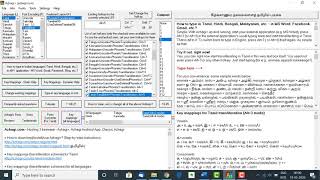
- Various text boxes have been added to the opening screen with transliteration key mappings and other informatory contents.
- There is an in-built Tamil Unicode editor now, right in the opening screen of Azhagi+ itself.
- You can keep the opening screen compact (without the informatory contents, etc.) by clicking the 'Compact' button.
- Note: The informatory text boxes and inbuilt text editor are for users (beginners or otherwise) who are not comfortable clicking the help 'buttons and menu items' to get the required help and rather feel 'easy cosy' if the opening screen itself contains most of the vital information.
- Note: The informatory text boxes and inbuilt text editor are for users (beginners or otherwise) who are not comfortable clicking the help 'buttons and menu items' to get the required help and rather feel 'easy cosy' if the opening screen itself contains most of the vital information.
- The Non-Unicode font encodings (Stmzh, Vanavil, Shreelipi, Diamond) transliteration text files which were earlier made available to users only on an on-request basis are now part of Azhagi+ itself. So, apart from typing in the already existing Non-Unicode encodings (SaiIndira, TAB, TAM, Tscii, Bamini, TamilBible), one can now straightaway start typing in the encodings of Stmzh, Vanavil, Shreelipi and Diamond too.
- Azhagi+ 10.29 (Released: 9th Nov, 2016)
- Pressing an hotkey helps you operate globally. What it means is that once you press Alt+3 (Ctrl+1, etc.) in an application, then, not only in that application, in whichever application (any text area of it) you type, you will get Tamil (Hindi, etc.) displayed. This was the only way I could make Azhagi+ type in Windows Store Apps in Windows 10 operating system. Hence, this significant change. As of now, this is the way to go.
- While keeping Ctrl or Alt pressed itself, changing to the other LFKs by pressing 1, 2, 3, etc. is possible.
- Whoever was facing problems transliterating in Unicode Tamil in Excel 2016 (2013, etc.) can now start typing seamlessly in them in Unicode Tamil (in 'Alt+3' Unicode+Tamil+PhoneticTransliteration mode alone). 'Alt+4' Unicode+Tamil+UserDefinedPhonetics1 mode will not be helpful.
- To transliterate seamlessly in Excel 2016 (2013, etc.), you have to TICK the option 'Settings->GENERAL->Effect typing in Excel mode'. As and when you wish to type in other applications, you have to necessarily UNTICK the aforesaid option.
- Azhagi+ 10.25 (Released: 4th May, 2015)
- This was a major release. Hence, there were lots of changes. So, please visit new.php to know about all the changes.
- Azhagi+ 10.24 (Released: 23rd Apr, 2015)
- There is a new option added under 'Settings->More Preferences...->' captioned as 'Retain the language in Language Bar'.
- If you keep ticked the abovementioned option, then whenever you start typing in a particuar LFK (e.g. Hindi+Unicode+PhoneticTransliteration), the language in the system's language bar will not change at all. AzhagiPlus's language icon alone will change.
- The above scenario is a must whenever you wish to type in MS-Word in a customised LFK whose font encoding is not based on Unicode. For e.g. an LFK like "Tamil+Bamini+PhoneticTransliteration", where Bamini is a non-Unicode Tamil font.
- The abovementioned option should be ALWAYS kept ticked in Windows 8. It should NOT be unticked.
- There is no need, as such, to untick the abovementioned option in Win7 either.
- However, you may have to necessarily keep the abovementinoned option unticked in WinXP, if you see boxes while typing in MS-Word or if you face any such issues while typing in any other application.
- Azhagi+ 10.23 (Released: 4th May, 2014)
- This is a major release.
- A handful of users reported that the system's language bar was not changing back to the system's default input language { for instance, EN [ i.e. English (United States) ] } after it got set by Azhagi+ to a particular Indian language ( say, TA [Tamil] ). This release solves that problem.
- A new menu item 'More Preferences...' has been added under 'Settings' menu in main interface.
- Clicking the abovementioned menu item, you can now find two schemes provided for Tamil phonetic transliteration - 'Classic' and 'Extended'. 'Classic scheme' is the usual scheme provided for Tamil phonetic transliteration, all these years (i.e. until version 10.21). Now (version 10.22 onwards), by choosing 'Extended scheme' (which is the default), you can effect the following:
- You can get ஶ், ஶ, ஶா, ஶி, ஶீ, ஶு, ஶூ, ஶெ, ஶே, ஶை, ஶொ, ஶோ, ஶௌ by typing Sh, Sha, Shaa, ..., etc. (please note that these characters may not appear properly in Windows XP systems. So, you need to have an operating system which is WinVista, Win7 or above).
- You can get செலக்ஷன், டைரக்ஷன், எலக்ஷன், etc. by typing selacshan, dairacshan, elacshan (or selakxshan, dairakxshan, elakxshan, etc.), etc. If you do not mind getting செலெக்ஷன், டைரக்ஷன், எலக்ஷன், etc. itself, you can type selakshan, dairakshan, elakshan, etc. as usual.
Note: 'x' modifier has been used for 'k', consistent with such usage in transliteration scheme of other Indian languages. - 'x' modifier can also be used after 1, 2, 3, ..., ..., ..., 9 - to get Tamil numerals(numbers). i.e. typing 1x will give ௧, 2x will give ௨, 3x will give ௩, ..., ..., ..., 9x will give ௯.
- The 'x' modifier for 'k' and 1, 2, 3, etc. are made available in the 'Classic scheme' also, as of now. Other than that, there are no changes/additions in the 'Classic scheme', as of now.
- The default hotkey for 'Tamil+Unicode+Tamilnet99' LFK has been changed to Alt+6.
- There was an error which was occurring very rarely in some very rare systems. That has been fixed.
- Some minor fixes (with respect to all languages).
- I released 10.22 Beta too - on 14th March, 2014. But, since 10.22 had major modifications (same as the key changes listed for version 10.23 above), a few glitches got in. I rectified the same and released 10.23.
- Azhagi+ 10.21 (Adhoc Release: 27th December, 2013)
- Please understand well that the above download (released on 27-12-2013) does not contain any setup file. It contains the executable (Azhagi-Plus.exe)^ alone.
- This 'adhoc' download is not for normal users. So, if you are not facing any problems with Azhagi+ 10.21 which is available for download from the home page of azhagi.com, then kindly ignore this 'adhoc' download totally.
- On the other hand, in case you are facing any problems*, then kindly make use of this download. After downloading, copy the executable (Azhagi-Plus.exe) and paste it in the directory# in which you had earlier installed Azhagi+ so that the 'Azhagi-Plus.exe' existing in that directory is replaced by the executable which you downloaded.
(*) One dear user reported sometime ago that in his system and 2 or 3 of his friends', the system's language bar was not changing back to the system's default input language { for instance, EN [ i.e. English (United States) ] } after it got set by Azhagi+ to a particular Indian language ( say, TA [Tamil] ). This 'adhoc' release solves that problem and that is the primary and only purpose of this release itself.
(#) For e.g., "C:\Program Files\Azhagi+" or "C:\Program Files (x86)\Azhagi+" or something like "C:\Portable Apps\Azhagi+".
(^) Hash values for this 'adhoc' Azhagi-Plus.exe can be viewed here, for those who feel the need for the same.
- Azhagi+ 10.21 (Released: 26th June, 2013)
- Changes (new buttons, menus) in main interface.
- While typing in Assamese, OS language bar will now display 'AS' (in Win Vista and above).
- Azhagi+ 10.20 (Released: 14th Mar, 2013)
- Very minor updates in the contents of the help topics.
- Corrected a few errors in the keywords under 'Index' tab of the help document.
- Two other minor errors rectified.
- Azhagi+ 10.19 (Released: 7th Mar, 2013)
- Updated the help document with more significant contents.
- Added an useful facility by which one can now view the key mappings for ALL the languages (LFKs, as such) from within the help document itself.
- Location of 'AzhagiPlus.chm' changed to the root of the installation directory.
- A few other minor changes - additional menu items, etc.
- Azhagi+ 10.18 (Released: 10th Jan, 2013)
- A few minor changes - additional menu items, etc.
- Caption of 'OK' button in starting screen changed to 'Set/Change the hotkey'.
- Azhagi+ 10.17 (Released: 23rd May, 2012)
- A few changes in Dynamic key mappings help screen.
- ALL keystroke sequences (as specified here) for Tamilnet99 keyboard layout have now been incorporated. For details, please see multi-np.php.
- Azhagi+ 10.16 (Released: 26th March, 2012)
- Dynamic key mappings help is now available for all languages except Tamil.
- One can change existing key mappings for any LFK (Language+Font+Keyboard) combination, except Tamil+Unicode+PhoneticTransliteration. One can create an entirely new keyboard layout (LFK, as such) itself for processing by Azhagi+.
- Azhagi+ 10.15 (Released: 22nd March, 2012)
- Dynamic key mappings help is now available for all languages except Tamil, Oriya and Assamese.
- One of the opening screen's button text changed; a new menu item added under 'Help'.
- Azhagi+ 10.14 (Released: 1st January, 2012)
- In 'Settings', a new option 'Use my own keyboard layout' was added under 'Other Languages' category.
- The above option is to facilitate the user to change the existing key mappings for any language in any way he/she wants. As such, user can create his own keyboard layout (i.e. an entirely new keyboard layout consisting entirely of his own key mappings).
- Right now, the above facility can be achieved only by a reasonably tech-savvy person who knows to edit ".xml" files. Also, this is my first attempt on providing this facility. Hence, it awaits user-feedback on 100% perfect functioning. Instructions for editing .xml files will be given later after sufficient positive user-feedback.
- Also, right now, the above facility can be utilised to change key mappings (or create an entirely new keyboard layout) only for Devanagari script (i.e. Hindi, Sanskrit, Marathi, etc.)
- Azhagi+ 10.12 (Released: 17th December, 2011)
- Dynamic (see-as-you-type) HELP for key mappings. At present, this is only for Hindi. Future versions will have 'dynamic help' for all languages.
- Right-clicking the 'language indicator' icon (of Azhagi+) in system tray will now show/hide the 'Dynamic Help' screen.
- 'Hotkeys' button added to 'static help' screen which when clicked will list the currently set hotkeys.
- Main opening application interface changed considerably.
- Azhagi+ 10.11 (Released: 23rd November, 2011)
- A concise help file (AzhagiPlus.chm) has been added.
- Links to topics in the abovementioned help file added under 'Help' menu of Azhagi+. For e.g. 'Contents'.
- Azhagi+ 10.10 (Released: 14th Nov, 2011)
- In Win Vista/7, for Oriya, system's language bar was not displaying 'OR' after pressing the hotkey for typing in Oriya. This has been rectified.
- A few other minor internal changes.
- Azhagi+ 10.9 (Released: 12th Nov, 2011)
- LFKs for Unicode transliteration in Gujarati, Bengali, Punjabi, Oriya and Assamese added.
- Left-clicking the 'language indicator' icon (of Azhagi+) in system tray will now show/hide the in-built keymappings help screen.
- Right-clicking the 'language indicator' icon (of Azhagi+) in system tray will now show details for hooked application, hotkey pressed and LFK.
- Azhagi+ 10.7 (Released: 9th Nov, 2011)
- Inbuilt help for Hindi key-mappings provided.
- Button captioned 'Key Mappings - Help' added to Azhagi+ opening interface.
- Azhagi+ 10.6 (Released: 24th Oct, 2011)
- LFKs for Unicode transliteration in Telugu, Kannada and Malayalam added.
- Small changes in Azhagi+ opening interface.
- Azhagi+ 10.5 (Released: 7th Oct, 2011)
- LFKs for Unicode transliteration in Hindi, Sanskrit, Marathi and Konkani added.
- Small changes in Azhagi+ opening interface.
- In 'Settings', a new category (Other Languages) and options under it were added.
- Azhagi+ 10.4 (Released: 4th Sep, 2011)
- An option 'Two consecute agara uyir-meys rule' was added under TamilNet99 input mode.
- If the application in which input was being done was closed abruptly without pressing F10 (or the required hotkey) to come back to normal typing mode in English (or user's default language), the language indicator icon (say 'TA') remained intact in the system tray, in earlier versions. In this version, in such abovesaid cases, the language indicator icon will get removed from the system tray within 5 seconds.
- Azhagi+ 10.3 (Released: 20th Aug, 2011)
- Tamil+Unicode+Tamilnet99 got added.
- Unlike Azhagi, Azhagi+'s Tamilnet99 input mode allows a rule (specified by Tamilnet99 standards) which ensures that if an agara uyirmey is typed twice consecutively, a diacritic is added to the first one. For e.g. tha+tha = iththa.
Note: Some users are not in favour of using this rule and hence future versions will have this rule as an option. - Azhagi+ 10.2 (Released: 12th Aug, 2011)
- Start Azhagi along with Windows
- Start Azhagi silently (i.e. show it's system tray icon alone)
- Pressing 'X' (Close) button minimizes Azhagi to tray
- Start Azhagi minimized (i.e. show in taskbar)
- Show balloon-tip info at Azhagi startup
- Azhagi+ 10.1 (Released: 29th April, 2011)
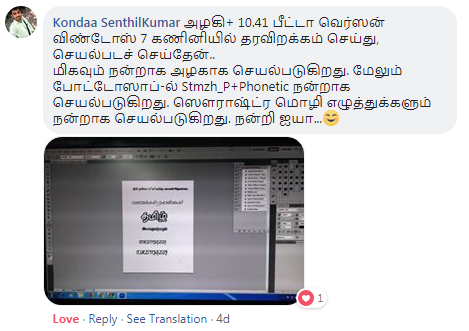
Testimonial 1 (for Windows 7) - A comment as follows by Sri Kondaa Senthilkumar in Azhagi's Facebook Group
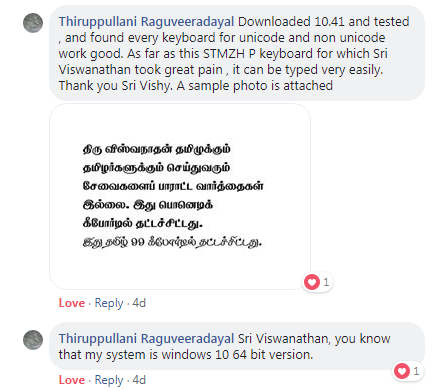
Testimonial 2 (for Windows 10) - A comment as follows by Sri Raguveeradayal in Azhagi's Facebook Group
Testimonial 3 (for Windows XP) - A comment as follows by Sri Muthuswamy in Whatsapp
-
Windows XP-இல் Photoshop CS 6, InDesign CS 6, CorelDraw X6, MS Word 2010, Open Office writer 4.1.5 ஆகிய சாஃப்ட்வேர்களில் அழகி+ 10.41 சிறப்பாக வேலை செய்கிறது சார். Tamilnet99 மட்டும் செக் செய்தேன். Stmzh_P Tamilnet99 சிறப்பாக வேலை செய்கிறது சார்.
-
This is an 'adhoc' release of the 'Azhagi+ 10.21 executable' alone.
To download it (Azhagi-Plus.exe), please click here. The zipped version is here.
Note:
Key Changes:
-
Less than 90Kb
Following options were added under 'General' section of 'Other Settings'.
First release of Azhagi+
Less than 90Kb
Please see azhagi.com/plus
Azhagi - Beta Versions
Note: Herebelow you can find two beta versions of Azhagi. One of these beta versions may help solve problems, if any, you face with the current (6.3.1) or earlier versions of Azhagi. So, kindly try one of the beta versions first to see whether it solves your problems. If it does not, then uninstall the existing beta version and try the other one. You can also start using Azhagi+ (AzhagiPlus). Tamil Typewriter (Old) mode is available in Azhagi+ (AzhagiPlus). You have to download and use the latest version of AzhagiPlus - version 10.25 (repacked in Aug 2015) - for availing the same. ALT+7 is the hotkey to type in Unicode in Typewriter(Old) mode, using Azhagi+.- 12th Aug, 2010 - Azhagi 6.2.9 - SBS2
-
Azhagi-Setup-629-sbs2.exe - Kindly click this link to download azhagi-6.2.9-sbs2 as an executable file.
- In earlier versions, there was a problem in Windows Vista/7 or XP-SP3 systems when typing in Tamilnet99 or Tamil typewriter input mode (in certain MS-Office applications alone). This beta version solves that problem.
Azhagi-Setup-629-sbs2.zip - Kindly click this link to download azhagi-6.2.9-sbs2 as a zip file.
Remarks:
- In earlier versions, there was a problem in Windows Vista/7 or XP-SP3 systems when typing in Tamilnet99 or Tamil typewriter input mode (in certain MS-Office applications alone). This beta version solves that problem.
- 4th Aug, 2010 - Azhagi 6.2.9 - SBS1
-
Azhagi-Setup-629-sbs1.exe - Kindly click this link to download azhagi-6.2.9-sbs1 as an executable file.
- In earlier versions, there was a problem in Windows Vista/7 or XP-SP3 systems when typing in Tamilnet99 or Tamil typewriter input mode (in certain MS-Office applications alone). This beta version solves that problem for Tamilnet99 input mode in MS-Office applications.
- Two new menu items 'OS Version Info' and 'Start Microsoft Wordpad' have been added under 'Tools' menu of Azhagi's Unicode editor.
Azhagi-Setup-629-sbs1.zip - Kindly click this link to download azhagi-6.2.9-sbs1 as a zip file.
Remarks:
- In earlier versions, there was a problem in Windows Vista/7 or XP-SP3 systems when typing in Tamilnet99 or Tamil typewriter input mode (in certain MS-Office applications alone). This beta version solves that problem for Tamilnet99 input mode in MS-Office applications.