Azhagi - Different and Friendly - Since 2000
Different and Friendly
- easy, fast, flexible, natural and intuitive -

Providing a unique Tamil transliteration scheme, since year 2000...


  Users    Reviews    Testimonials   Contacts  

English to Indian Language Key-Mappings 
Note: If you are using an earlier version of Azhagi, kindly upgrade to the latest version 6.2.6 (released on July 11 2010) and above, because the key-mappings have undergone some changes (except for Tamil) and also some new ones have been introduced. The key-mappings below pertain only to the latest version of Azhagi as mentioned above.
  • English to Tamil Transliteration Scheme/Rules (i.e. English to Tamil letter/character/key mappings)
    Modern Style  |  Loads of Help tips

  • English to Hindi Transliteration Scheme/Rules (i.e. English to Hindi letter/character/key mappings)
    Classic Style  |  Modern Style

    Sanskrit, Marathi, Konkani, etc. (i.e. like Hindi, all other languages which use Devanagari script) also get covered under this transliteration scheme.

  • English to Telugu Transliteration Scheme/Rules (i.e. English to Telugu letter/character/key mappings)
    Classic Style  |  Modern Style

  • English to Kannada Transliteration Scheme/Rules (i.e. English to Kannada letter/character/key mappings)
    Classic Style  |  Modern Style

  • English to Malayalam Transliteration Scheme/Rules (i.e. English to Malayalam letter/character/key mappings)
    Classic Style  |  Modern Style

  • English to Gujarati Transliteration Scheme/Rules (i.e. English to Gujarati letter/character/key mappings)
    Classic Style  |  Modern Style

  • English to Bengali Transliteration Scheme/Rules (i.e. English to Bengali letter/character/key mappings)
    Classic Style  |  Modern Style

  • English to Punjabi Transliteration Scheme/Rules (i.e. English to Punjabi letter/character/key mappings)
    Classic Style  |  Modern Style

  • English to Oriya Transliteration Scheme/Rules (i.e. English to Oriya letter/character/key mappings)
    Classic Style  |  Modern Style

  • English to Assamese Transliteration Scheme/Rules (i.e. English to Assamese letter/character/key mappings)
    Classic Style  |  Modern Style


How to type in Hindi, Malayalam, etc. in external applications like Gmail, MS-Word, etc. 
Please visit http//azhagi.com/uniall.html for step-by-step instructions


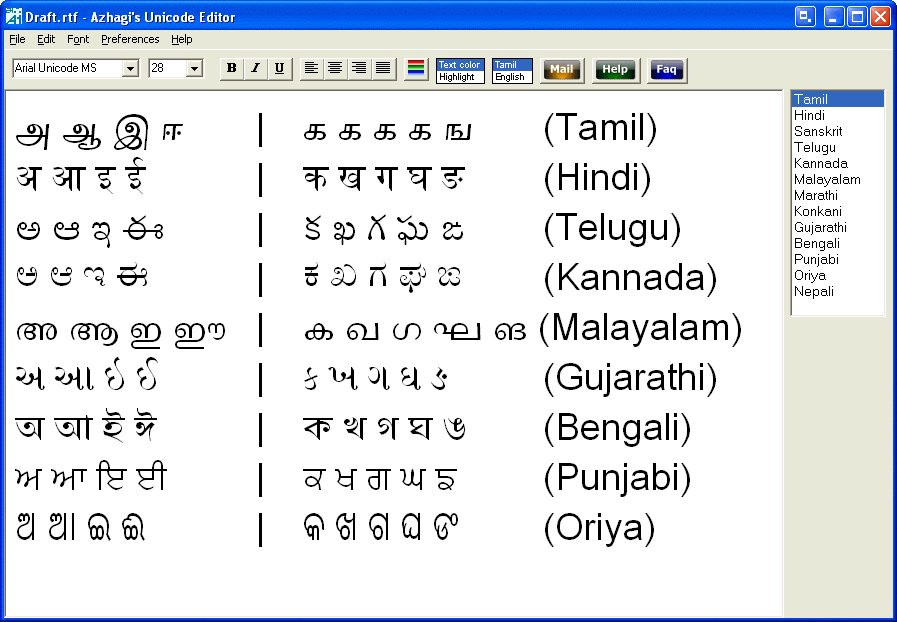
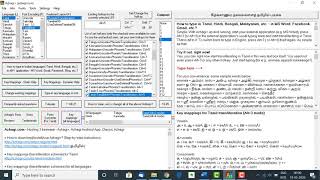
Azhagi's Unicode Editor interface with multiple languages 
There are various Unicode fonts specific to each Indian language in Windows operating system (like Latha for Tamil, Gautami for Telugu, etc.). However, there is a font named 'Arial Unicode MS' which comprises all the characters of all Indian languages. There is also a shareware font called 'Code2000' which also compries all characters of all Indian languages. Herebelow is a screenshot of Azhagi's Unicode Editor which shows characters displayed in 'Arial Unicode MS' font.

ScreenShot (depicting multilingual display in 'Arial Unicode MS' font)


Important info on 'Arial Unicode MS' 
'Arial Unicode MS' ('aum' for short) is supplied along with Microsoft Office 2002 (i.e. Office XP), Microsoft Office 2003 and above. So, if you have MS office 2002 and above, you should be having this font in your system by default. To know whether you have this font, just open up any editor (say MS-Word) and check the 'Fonts' dropdown listbox (Or, click on 'Start->Settings->Control Panel->Fonts' and see whether this font is listed). Whether you find 'aum' in your system or not, you shall download Code2000 (c2k for short) font. Details on it are in the next section. Our sincere thanks should go to the author of 'c2k' for his EXTREMELY painstaking effort in creating such a wonderful font.
Note: Using 'aum', in Azhagi's Unicode editor, for Malayalam, the conjunct consonants (ippa, iNNa, etc. etc.) were not getting displayed in the right manner. Also, using 'aum' in MS-Word, the chillu forms of Malayalam were not getting formed. Such problems were not noticed for Malayalam while using 'c2k' font or the default 'kartika' font.


Important info on 'Code2000' 
'Code2000' ('c2k' for short) is available for download here - http://www.code2000.net/code2000_page.htm. Visit this page and navigate to the bottom of this page. Therein, you will find the link to download this font. After downloading, unzip the downloaded file (code2000.zip) and extract the font (code2000.ttf) to 'c:\windows\fonts' directory. That's all to it. Read below for details.


Important info on other Unicode fonts 
MS has developed Unicode fonts specific to each Indian language. They are loaded along with the installation of the OS (operating system) itself or along with the installation of certain Microsoft products. A list of them is as follows.
Font Name Language OS or Product
Latha Tamil Win2K and above
Mangal* Hindi* Win2K and above
Gautami Telugu WinXP and above
Tunga Kannada WinXP and above
Kartika Malayalam Win XP SP2 and above
Shruti Gujarati WinXP and above
Vrinda Bengali Win XP SP2 and above
Raavi Punjabi WinXP and above
Kalinga Oriya Win Vista and above
Arial Unicode MS All Indian languages Office 2002 and above

(*) 'Mangal' font can be used not only for Hindi but for any other language which uses Devanagari script - like Sanskrit, Marathi, etc.


Options for Unicode transliteration 
  • 'Classic' and 'Modern' transliteration scheme styles

    Azhagi provides two different styles of fundamental transliteration schemes. The core difference between the two schemes is in the mappings for the 'ta' and 'tha' series. In the classic style, the 'ta' series is mapped using 'T, Th, D, Dh' and the 'tha' series is mapped using 't, th, d, dh'. In the modern style, the mappings are "t, T, d, D" and "th, Th, dh, Dh" resp.

    The modern style is given for those (particularly the Tamil-speaking) who may find it convenient to transliterate using this style. Please note that there are NO 4 'ta's and 4 'tha's in the Tamil language. There is only one letter which represents either the sound of 'ta' or 'da'. Similarly, there is only one letter which represents the sound of either 'tha' or 'dha'. Hence, giving the mappings of "t, T, d, D" for the 'ta' series and "th, Th, dh, Dh" for the 'tha' series will be of great help to them. This was my personal experience and hence the modern style is given. Those who are accustomed to the 'classic style' can continue to transliterate using that style and as a matter of fact that is the default style set when Azhagi is started first.

    To change style from 'classic' to 'modern', in Azhagi's Unicode editor, click on 'Tools->Options' and select the appropriate style.

  • 'ch' mapping

    In Azhagi's Unicode editor, if you click on 'Tools->Options' and tick the 'ch, Ch' checkbox, then 'ch' would also take the same mapping as that of 'c'. For e.g. if you are transliterating in Hindi and if you have ticked the abovesaid option, then typing 'ch' (in addition to 'c') would give 'च' and 'C/Ch' alone would map to 'छ'. Those who are habituated to type 'ch' to get 'च' can make use of this option. Please note that when Azhagi starts first, the default setting is that this option is kept unticked so that 'c' alone gives 'च' and 'ch' (along with C and Ch) gives 'छ'.

  • More options...

    More options as above might be introduced in the future. As and when they are introduced, they will be explained here.

IMEs from Google and Microsoft 
As of Dec 2009, Google and Microsoft have released their own IMEs (input method editors) which help one to transliterate directly in all applications in many Indian languages. Google's IME is available for download here and Microsoft's IME is available for download here. If you are new to transliteration, I suggest you to try out these free-form transliterators from Google and Microsoft which seem to be based on a transliteration dictionary fundamentally, and hence extremely user-friendly and fast. If you are interested to read more remarks of mine on these transliterators, please click here

In Future? 
Please visit inno.html and inno-help.html