

laptop_windows_laptop_windows
Differences between Azhagi+ and Azhagi
Related pages: Azhagi - operating manual, AzhagiPlus - operating manual
 Comparison Table
Comparison Table
| Description | Azhagi (azhagi.com/easy.php) | Azhagi+ (azhagi.com/plus) |
| First public release | 2000 | 29.Apr.2011 |
| Operating Systems | Windows 9X / XP / Vista / 7 / 8 / 8.1 / 10 | Windows XP / Vista / 7 / 8 / 8.1 / 10 |
| Current version |
 6.3.1 | Released 15.Oct.2012 6.3.1 | Released 15.Oct.2012
|
 10.45 | Released 14.Oct.2018 10.45 | Released 14.Oct.2018
|
| Beta versions | 6.2.9 SBS-1 and SBS-2 | Released 4th and 12th Aug 2010 resp. Downloadable from sbetas.php | Currently, none. |
| Details | How to operate? | Details: easy.php | How to operate: oper.php | Details: plus.php | How to operate: oper-plus.php |
| Portable version available? | - No - | - YES - |
| Future updates | Rarely | As regularly as possible (amidst my limited resources) |
| Languages and scripts supported | Tamil, Hindi, Sanskrit, Telugu, Malayalam, Kannada, Marathi, Gujarati, Bengali, Punjabi, Oriya, Assamese, etc. |
As such, ANY World language/script By default, Tamil, Hindi, Sanskrit, Telugu, Kannada, Malayalam, Marathi, Konkani, Gujarati, Sourashtra, Bengali, Assamese, Punjabi, Oriya, Devanagari and Grantha are supported. |
| Font encodings supported | Unicode and Tscii |
As such, ANY font and ANY font encoding. By default: Unicode, Tab, Tam, Tscii, Vanavil, Shreelipi, Shree, Stmzh, LT-TM, Gee_Tamil, ELCOT-ANSI, ELCOT-Bilingual, DCI+Tml+Ismail, Ka, SunTommy font encodings. By default: SaiIndira, TamilBible, Bamini, Amudham and Diamond fonts. |
| Keyboard layouts (input modes) | Phonetic (Transliteration), TamilNet99, TamilTypewriter |
As such, ANY keyboard layout. By default: Phonetic Transliteration, TamilNet99, Tamil Typewriter Old and Inscript. |
| Key features |
Unique Tamil transliteration scheme; Direct indic transliteration/typing in ALL windows applications; Floating key'mapping tables; For Tamil - Unique features like Auto Transliteration, Reverse transliteration, Dual Screen transliteration, SAT transliteration, Pop-up transliteration, etc.; And, more... Full features list at feats.php. Note: Unlike Azhagi+, in Azhagi, to type in Unicode in MS-Word in WinXP, Unicode has to be enabled fully. Also, in Azhagi, you cannot type the rupee sign (₹) and certain Tamil characters like ௳, ௴, ௵, ௶, ௷, ௸, ௹, ௺, ஶ and ௐ. You can type them all in Azhagi+ only. You can type க்ஷ் (without forming க்ஷ்) in Azhagi+ only. |
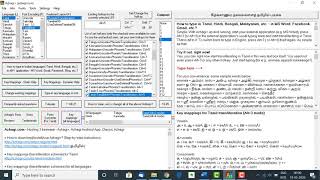
Unique Tamil transliteration scheme; Direct indic transliteration/typing in ALL windows applications; First-of-its-kind 'Font Encodings Converter'; Typing in Unicode in MS-Word even without enabling Unicode fully in WinXP (as of now, a unique capability of Azhagi+); User-defined hotkeys; 'Dynamic' help for mappings. And, much more... Full features list at plus.php. Note: Features like auto / reverse / dual'screen / SAT transliteration, etc. are NOT available in Azhagi+. |
| Issues |
1. Users who type in Tamilnet99 or Tamil typewriter keyboard layouts using Azhagi 6.2.7 could not type a few characters properly in Win Vista/7. 2. Kaspersky and Trident generate false positives for Azhagi. Either they throw frequent false messages about Azhagi's behaviour (Or) completely stall the operations of Azhagi (whereby users are unable to see any characters displayed in the typing area of any application once the hotkey [F10] is pressed and typing is effected). |
None |
| Solutions |
1. Beta versions (either 6.2.9 SBS-1 or SBS-2) solved the issues. 2. Users have to EITHER use other standard softwares like Avg, Avast, etc. OR make necessary changes in the settings / options of Kaspersky or Trident to let those softwares know that they should not generate false positives for Azhagi. |
Not applicable |
Benefits of Azhagi+
[when compared to Azhagi]- Read the features list
Kindly take some time to read all about Azhagi+ at azhagi.com/plus OR at least read Azhagi's features list alone OR at least read Azhagi+'s key highlights alone and either of them will make you understand all the benefits you attain by using Azhagi+. It is not that you have to discard classic Azhagi in order to use Azhagi+. Both Azhagi and Azhagi+ can co-exist and you can benefit by using the unique and special features of both. Well, if you are not tech-savvy enough to read and understand the features of Azhagi+, then please scroll down to read the points below which highlight the added benefits in using AzhagiPlus.
- Any hotkey can be set
User can set any hotkey (e.g. Alt+1, Win+F10, Ctrl+Shift+3, etc.) and press the same to put Azhagi+ in 'Direct Typing' mode. Hotkey is not limited to 'F10' (F11 and F12) any more. So, issue with F10 (F11 and F12) in laptops, caused by extraneous factors, is solved for ever.
- No need to enable Unicode in WinXP
With Azhagi, in Win XP/2003 alone, you have to enable Unicode fully (and also add an additional keyboard) in order to type in Unicode Tamil (Hindi, etc.) in MS-Word/Powerpoint. This is not required in Azhagi+.
Using Azhagi+, you can straightaway start typing in Indian languages in MS-Word and MS-Powerpoint in WinXP systems even without enabling Unicode fully. Please note that for this feature to work, you have to install Azhagi+ using the regular AzhagiPlus-Setup.exe and NOT the portable version.
If you wish to use the portable version of Azhagi+ in WinXP, then please read this without fail.
- Portable*

No setup.exe needed. Extract and Run. That is all to it. This means, apart from running from your usual computer systems (desktops, laptops, etc.), Azhagi+ can be run even from your pen-drive, external HDD (and similar devices) and thus carried with you wherever you go and straightaway used in whichever system you come across. No prior installation is needed. This portable nature of Azhagi+ enables one to use Azhagi+ in such office environments too where executing 'setup.exe' of any extraneous application is not allowed.
The portable version of Azhagi+ can be downloaded from here.
(*) If you are not conversant with 'PORTABLE' softwares and wish to know more about them, kindly please click here.
- Small size
Extremely small download size (less than 600KB - the whole of Azhagi+ zipped, as of Jan 2017). Though this is only of academic interest in these days of high speed internet connection, it might be of help still, in certain areas and certain circumstances. Also, it might be a matter of certain interest for tech'people, as well as certain users.
- Two useful and powerful features
 Change existing key mappings.
Create your own keyboard layouts.
Yes, the facility to quickly modify existing key mappings for any language in any way. 'Modify' means all four of 'add', 'change', 'delete' and 'customize'.
And, the facility to easily create your own keyboard layout - that is, an entirely new keyboard layout consisting entirely of your own key mappings (or the key mappings of any language's font you are accustomed to) - and start typing in the same.
- Via the above two features, Azhagi+ is easily extendable to effect typing in any language+font+keyboard combination. Basically, this is achieved by a very simple process of just editing an XML text file in Notepad.
- Specifically for Tamil, Azhagi+ provides a never-before-seen facility by which one can extend Azhagi+ to transliterate in 'ANY non-Unicode Tamil font (or non-Unicode Tamil font encoding)' just by creating a simple text file of about 30 lines itself!
- Via the above two features, Azhagi+ is easily extendable to effect typing in any language+font+keyboard combination. Basically, this is achieved by a very simple process of just editing an XML text file in Notepad.
- Interested in knowing further more on Azhagi's benefits?
Well, as stated at the beginning of this section itself, kindly take some time to read all about Azhagi+ at azhagi.com/plus OR at least read Azhagi's features list alone OR at least read Azhagi+'s key highlights alone and either of them will make you understand all the benefits you attain by using Azhagi+.