
Softwares for computing in Indian languages  Indic Softwares Downloads 100s of Free Fonts  100s of Free Tamil and other Indian Language Fonts


Two unique freewares

  • Azhagi.com provides 2 free unique softwares:

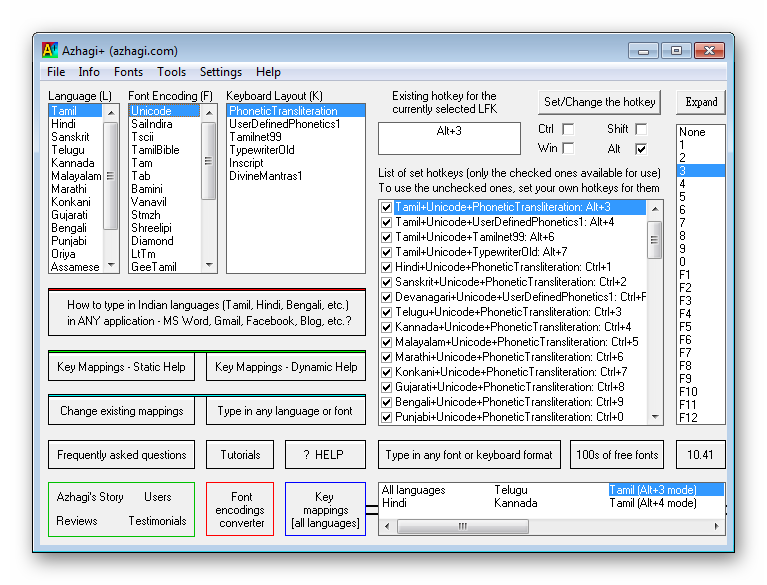
    Azhagi+ Azhagi

  • Azhagi+ and Azhagi are two 'different' softwares.

  • Kindly install and use both of them in your system.

  • Both are 100% free. Support is free too - details here.

  • Features of Azhagi+ - here | Features of Azhagi - here.


Downloads | Manuals | Fonts

  • Azhagi+ 10.15
  • Azhagi 6.2.7
  •  

    Type in

  • Tamil
  • Hindi
  • Sanskrit
  • Telugu
  • Kannada
  • Malayalam
  • Marathi
  • Gujarati
  • Bengali
  • Punjabi
  • Oriya
  • Assamese
  • Highlights: Unique Tamil transliteration scheme * Easy and lucid modes to transliterate/type in ALL major Indian languages in ALL Windows applications * Two exciting tools - 1) to change existing key mappings - 2) to easily create your own new keyboard layout for any language/font combination * Set any hotkey for any LFK * Powerful tools for Tamil - Auto transliteration, Reverse Transliteration, SAT transliteration, Dual Screen Transliteration * And, more...

    Nota Bene: A portable version is also available - please see below    *    Further, Azhagi+ is regularly updated. You can find beta versions here.

    'Portable' Azhagi+

    • If (and only if) you are conversant with portable softwares, then you can download and use Azhagi+ in portable mode too. Portable version of Azhagi+ is fully compatible with Win Vista/7 and above. In WinXP also you can use the portable version, but with a limitation.

      What are portable softwares?       Download Azhagi+ Portable.zip

      • Just 350 Kb.
      • No need to install.
      • Unzip and run. That is it.
      • Carry it in your pen-drive.
      • Use it anywhere, any time...

    Release Details

    • Current version of Azhagi+: 10.15, 22.Mar.2012

    • Current version of Azhagi: 6.2.7, 01.Aug.2010

    OS Requirements

    • Win98 and above for Azhagi | WinXP and above (incl. Win Vista/7) for Azhagi+

    • If you need Azhagi/Azhagi+ for MAC, Linux, Android, etc., please read this and act accordingly.

    Azhagi+ vs Azhagi - Differences

    • Kindly visit this page to see a tabulated chart of differences between Azhagi+ and Azhagi.

    Beta versions

    • Beta versions of both Azhagi and Azhagi+ are available for download at sbetas.html. Earlier versions - at befs.html.

    Download 100s of Free Fonts

    • To download 100s of Free Tamil fonts of various encodings - Unicode, Tscii, TAM, TAB, etc., - kindly click here.

    • Click here to get 100s of free Unicode fonts in Indian languages other than Tamil.

    Key Mappings

    • Online key mappings help available for all languages at multi.html.

    • In-built and comprehensive key-mappings help available for Tamil in 'Azhagi'.

    • Inbuilt and dynamic key-mappings help available for all other languages in 'Azhagi+'.

    Help and Support

    Story of Azhagi - Since 2000

    • Azhagi, since 2000, has been helping users worldwide to transliterate/type in Tamil with ease. Apart from Tamil, Azhagi and Azhagi+ help users to transliterate in other Indian languages too. Kindly visit story.html to get to know all about Azhagi's journey since 2000.

    Media Reviews, Press Reports

    Other Indic Softwares

    • Please see indic.azhagi.com. Therein, you can find various other softwares and tools (e.g. font converters, dictionaries, translators, text-2-speech softwares, etc., etc.) developed by various other selfless individuals and also commercial enterprises to aid in Indic computing (i.e. computing in Indian languages like Tamil, Hindi, Bengali, Gujarati, etc.). You can also read my short or detailed comments/reviews on few of the softwares.

    • As such, india.azhagi.com is my hearty thanks'giving page wherein I have taken the opportunity to offer my very sincere and utmost appreciation and gratitude to all developers of beneficial softwares and people who serve humanity in general.

    Acknowledgements

    Spread the News

    Kindly Contribute

    Societal Support

    About the Author

    Contacts


    Key Features of Azhagi+

    • Small, Sleek and Portable.

    • Two useful and powerful features:

      Indian languages typing software Azhagi+ - Unique, Natural, Easier and Faster - Sleek, small and portable  Change existing key mappings.

      Indian languages typing software Azhagi+ - Unique, Natural, Easier and Faster - Sleek, small and portable  Create your own keyboard layout.

      Yes, the facility to modify key mappings for ANY language in ANY way. 'Modify' means all four of 'add', 'change', 'delete' and 'customize'.

      And, the facility to create your own keyboard layout - that is, an entirely new keyboard layout consisting entirely of your own key mappings.

    • Option to set your own preferred separate hotkey for each and every 'Language+Font+KeyboardLayout' (LFK) combination.

    • 'See-As-You-Type' dynamic help for all key mappings. As such, for all LFKs.

    • Unique Tamil transliteration scheme: Natural, intuitive, flexible and user-friendly - enabling you to type more in less time (easier and faster).

    • A clear-cut, standard and uniform transliteration scheme, for all other Indian languages.

    • Direct typing/transliteration in ANY Windows application in Tamil, Hindi, Sanskrit, Telugu, Kannada, Malayalam, Marathi, Gujarati, Bengali, Punjabi, Oriya and Assamese.

    • Typing in Indian languages in MS-Word (and MS-Powerpoint) in Windows XP even without enabling Unicode fully (i.e. even without enabling the option "Install files for complex script ..." in the control panel applet 'Regional and Language Options'). As of now, this is a unique capability of Azhagi+.

    • System tray icon to indicate the language in which you are typing.

    • Option to set your own global hotkey for all combinations of 'Language+Font+KeyboardLayout' combination.

    • Various other options to customize your experience of operating Azhagi+.

    • Note: You may perhaps find the facility of having both a global hotkey and also a specific hotkey for each LFK (language+font+keyboard-layout combination) quite unique to Azhagi+. So too the facility to have not only individual function keys as hotkeys but any combination of Alt+Ctrl+Win+Shift (with enough no. of modifier suffixes) as hotkeys.

    Key Features of Azhagi

    • Apart from helping you to effect transliteration in Indian languages in ALL windows applications, Azhagi also provides you with unique and useful/powerful transliteration tools for Tamil like Auto Transliteration, Reverse Transliteration, Dual Screen Transliteration, SAT Transliteration, ...
    • Tamil Software Azhagi - Easier, Faster, Natural, Intuitive, Flexible - Peerless, Since 2000  Dual Screen Transliterator

      Indic Software Azhagi - Easier, Faster, Natural, Intuitive, Flexible - Peerless, Since 2000  Reverse Transliterator

      Type in Indian languages using Azhagi - Easier, Faster, Natural, Intuitive, Flexible - Peerless, Since 2000  Auto Transliterator

      Indian languages typing software Azhagi - Easier, Faster, Natural, Intuitive, Flexible - Unique, Since 2000  SAT Transliterator


    • You can effect 'Direct Tamil Input' in ALL applications - MS Office (Word, Excel, Powerpoint, ...), Outlook Express, Gmail, Yahoo! Messenger, GoogleTalk, Skype, Facebook, Notepad, Wordpad, Open Office (Writer, Calc, ...), Adobe applications (Pagemaker, Photoshop, ...), etc. etc. In effect, Type in Tamil, Transliterate in Tamil, Email-Chat-Blog in Tamil, Print-Publish in Tamil, Create databases-presentations-websites in Tamil, Happily post and comment in Facebook in Tamil - With 'ease'. Phonetic, TamilNet99 and Typewriter are the three input modes supported.

    • You can type in Hindi (and other Indian languages like Sanskrit, Malayalam, Telugu, Kannada, Marathi, Bengali, Punjabi, Gujarati, Oriya, etc.) vide transliteration, in all Unicode-aware applications - MS Office (Word, Excel, Powerpoint, ...), Outlook Express, Gmail, Yahoo! Messenger, Open Office (Writer, Calc, ...), etc.

    • And, do much more - for a tabulated list of features, click here | for details in full, do click here.

    FAQ - Frequently Asked Questions

    Users

    Users' Comments

    • சுந்தர், சென்னை
      ... கடந்த 4 வருட காலமாக அழகி மென்பொருளை உபயோகித்து வருகிறேன். நான் சென்னை "......"யில் வசித்து வருகிறேன்.

      சுருக்கமாக ஒன்றே ஒன்றைச் சொல்ல விரும்புகிறேன். இன்று நாங்கள் சாப்பிடும் உணவிற்கு நீங்கள்தான் பாதி காரணம். எப்படி வாழப் போகிறோம், எப்படி போட்டி போடப் போகிறோம், எப்படி சமாளிக்கப் போகிறோம் என்று பயந்து கொண்டிருந்த எனக்கு உங்கள் அழகி மென்பொருள் உதவியால் நம்பிக்கை வந்தது. தமிழ் டைப் செய்யத் தெரியாத நான் இப்போது இரண்டு கல்லூரிகளின் பிராஜக்ட் ஒர்க் செய்யும் அளவிற்கு முன்னேறி உள்ளேன்.

      எங்கள் பகுதியில் நான் ஒருவன் மட்டும்தான் தமிழில் தட்டச்சு செய்து தருகிறேன் என்பதை நினைக்கும்போது, என்னுடைய வெற்றிக்கு முகம் தெரியாத நீங்கள்தான் காரணம்.

      நான் இறைவனை வேண்டுவது உங்களுடைய வியாதி முற்றிலும் குணமாக வேண்டும் என்பது. .......... நன்றி. வணக்கம்.

    • Yamuna
      I discovered Azhagi yesterday evening after a Google search "type in tamil in MS word" and am so delighted to have come across this incredible piece of software. Installation was a snap, the instructions to get one started were so simple that I was able to get to my task with no learning curve. The translation table for tamil characters on a qwerty keyboard on your main page was enough to help me complete my task well. I was so happy with the software that I wanted to find more about the people behind it. I have no words to tell you how inspired I am by your life and work. My heartfelt thanks to you. Your words of advice in the interview were addressed to youth, they speak clearly to everyone, and I hope to keep them in my heart as I navigate my path. I want to wish you joy, success, long life, but most of all I pray that you'll abide in the turiya jnana state that you are seeking.

    • Only 2 sample comments given above. More sample comments can be read at comments.html (in English) and commentstam.html (in Tamil).


    Features of Azhagi - Tabulated

    100% Free

    Natural transliteration scheme which helps you transliterate in an easy, intuitive and flexible manner. Click here for details. y
    Direct Tamil Input in ANY Windows application in Tscii - Snapshot and details y
    Direct Unicode* Tamil Input in ANY Windows application - Snapshot and details
    By the inherent power of Unicode and its effective application in various MS applications, the following powerful/useful actions are possible:
    • your recipients (using Win XP/2K/2k3/Vista) do not require any prior font installation at their end to read your Unicode Tamil docs, mails, chats etc.
    • you can do 'Direct Tamil Input' in Word, Excel, Access etc. including IE Webforms, Google Talk, Blogs, Google Search and kind, without setting any Tamil font to start with. Font will be automatically chosen and set.
    • you can have the names of Files/Folders in Tamil.
    • you can do Find & Replace in Tamil directly in MS-Word, Excel, Powerpoint, Access, Notepad etc.
    • you can do Sorting in Tamil (arranging Tamil texts in ascending/descending order) in MS-Excel, MS-Word tables, MS-Access etc.
    • you can do Data Filtering in Tamil in MS-Excel.
    • you can Search in Tamil in google, yahoo!, msn etc. for e.g. click here
    • you can have your own personal blogs to opine your views in Tamil. for e.g. see mindpower
    • you can have online groups to share your thoughts in Tamil. for e.g. see azhagi
    • you can have your MP3 Songs list in Tamil in Windows Media Player etc.
    In effect, Type in Tamil, Save in Tamil, Print in Tamil, Email in Tamil, Chat in Tamil, Blog in Tamil, Write in facebook in Tamil, Create databases in Tamil, Create presentations in Tamil and Build websites in Tamil - with ease.
    y
    Direct Hindi transliteration in any Unicode-aware application - Snapshots and all other details.
    In effect, Type in Hindi, Save in Hindi, Print in Hindi, Publish in Hindi, Email in Hindi, Chat in Hindi, Blog in Hindi, Write in facebook in Hindi, Create databases in Hindi, Create presentations in Hindi and Create websites in Hindi. Typing (vide transliteration) in other Indian languages like Malayalam, Telugu, Kannada, Bengali, Punjabi, Gujarati, Oriya, etc. is also possible in any unicode-aware application. For more details on this, please click here
    y
    Auto'Transliteration - Convert (transliterate) your existing English texts (in MS-Word docs, Excel docs, Text fles, Web pages etc.) into Tamil in quick time. No need to retype your Tanglish texts to generate the Tamil equivalent. Click here for snapshot and click here for more details. y
    Reverse Transliteration - Converting Tamil to English - i.e. you can convert (transliterate) your existing Tamil texts back to English (i.e. Tanglish). No need to retype them in Tanglish. You can reverse transliterate only Tscii Tamil texts, as of now. So, if your existing text is in Unicode, it has to be converted to Tscii (using Azhagi's Font Converter tool) before effecting reverse transliteration. Click here for snapshot and click here for more details. y
    Change keyboard layout from 'Phonetic' to 'Tamil Typewriter' or 'Tamilnet99' y
    Always-on-top (on-screen) keymapping tables - both vertical & horizontal - (for beginners to see those tables and transliterate) y
    Unicode Editor - Azhagi has a fast and easy in-built Unicode Editor. You can type/save/email your Unicode text from within this editor (OR) copy/paste the Unicode text generated to any other external application/window like Wordpad, Outlook Express, Blogs, Google/Yahoo Email Message windows etc. Unlimited undo is allowed and there are several other useful features. Click here for snapshot and full details. y
    Unicode Fonts Lister - In the Unicode editor of Azhagi, you can find a Unicode Fonts Lister (Tools->'Unicode Fonts Lister').
    • This tool easily identifies and classifies (according to major Indian languages) all the Unicode fonts in your system.
    • The information thus provided by this tool will be useful either for you or any other user in a variety of ways. For instances:
      • It can help you to identify Unicode fonts which until this time you were not aware that they are unicode fonts.
      • It can help you to delete Unicode fonts which you are not using regularly.
      • It can help you to determine whether you need to download more Unicode fonts for any particular language.
    y
    SAT Transliteration - A new mode of transliteration (termed SAT) was introduced in Azhagi in Aug 2009 (incl. an introductory internal transliteration dictionary# with around 100 words). SAT mode had the potential to do the following and a few more:
    type 'Aditya' to get 'ஆதித்யா' !; no need to type 'aadhithyaa' !
    type 'vanakkam' to get 'வணக்கம்'; no need to type 'vaNakkam' using 'shift+n' !
    type 'doctor' to get 'டாக்டர்' (or even மருத்துவர் !, whichever the user finds right for his needs)

    But, with the advent of similar user-friendly (and seemingly 'transliteration dictionary' based) IMEs from Microsoft and Google soon after, I did not venture to enhance the dictionary# further or to extend SAT to external applications.
    y
    Tscii to Unicode conversion of HTML texts and files (*.html, *.text, *.js)
    Bulk conversion i.e. convert multiple files at the same time, from Tscii to Unicode
    y
    Unicode to Tscii conversion of texts (html or javascripts or any plain text)
    y
    Dynamic Tamil Web Font (both Tscii and Unicode compliant), to create your own Tamil website. See a sample site here. Click here for more details on availing a dynamic font. y
    Change English-to-Tamil keymappings of letters like 'z', 'nj', 'ng' etc. y
    Popup Transliteration - Transliterate and display a line/portion/whole (max. 4000 chars) of the text of an external document you are currently viewing (say an Ms-Word document), in a separate pop-up window (in Tscii, as of now) y
    --- The following features pertain to Azhagi's own in-built Tamil editor for Tscii ---
    Dual Screen Transliteration - Snapshot and details. Click here to read about the immense usefulness of Dual Screen Transliteration. y
    Single Screen Transliteration - Snapshot and details y
    On-screen Keymappings display - vertical (always-on-top), horizontal (either contained or always-on-top) y
    Email in Tamil. One-click instant button to send your emails thru Outlook Express etc. y
    Create Tamil documents in universally readable RTF format y
    Read your Tamil documents from MS-Word y
    Print your Tamil documents from MS-Word y
    Mixed Text typing (i.e. English and Tamil texts intermixed) y
    Copy/Paste your Tamil text to any external application (MS-Word, Pagemaker etc.) y
    Save your English and Tamil texts in two SEPARATE documents respectively and print/distribute/email them y
    Text formatting and alignment. Option to set start-up font size, color etc. y
    Use backquote character as mey-uyir separator y
    Find your Tamil text by typing in English (rather tanglish) itself, during 'Dual Screen' Transliteration y
    'Search & Replace' on both Tamil and English Text during 'Single Screen' Transliteration y
    Word Count (on both Tamil and English texts) y
    Show recent files accessed y
    Choose a favorite folder to access/save your Azhagi files y
    --- The above features pertain to Azhagi's own in-built Tamil editor for Tscii ---
    Learner's keypad to teach/learn Tamil easily, along with pronunciation tips y
    Type Tamil numerals y
    Auto'Insertion - Insert user-defined Tamil texts/paragraphs (e.g. 'murugan thunai', 'dear thambi', bharathiar poems, couplets from thirukkural, addresses, etc.) in any Windows application, using hotkeys. The user-defined texts can be in Tscii only, as of now. y
    Certain English words like 'dear', 'meals' etc. can be typed just as they are instead of having to type as 'diyar', 'meelS' etc. uto'Insertion - Insert user-defined Tamil texts/paragraphs (e.g. 'murugan thunai', 'dear thambi', bharathiar poems, couplets from thirukkural, addresses, etc.) in any Windows application, using hotkeys. The user-defined texts can be in Tscii only, as of now. y
    Conversion of your plain Tamil Text (in Tscii) to TAB encoding y
    Comprehensive, exhaustive Help documents y
    (*) To get to know more details on Unicode and typing in Unicode, please visit azhagi.com/uniset.html.

    # There are visitors who often reach azhagi.com searching for dictionaries (English to Tamil dictionary, Tamil to English Dictionary and similar dictionaries for other languages too - Hindi, Telugu, Kannada, Malayalam, Marathi, Gujarati, Bengali, etc.). Please note that links for free online dictionaries from Google, Wiktionary, etc. are available at indic.html#dictionary (Link to indic.html page has been provided at the top of this page too with caption 'Indic Softwares')


    Note: The following is a screenshot of the table available at mazhalaigal.com/tamil/learn/keys.php (thanks to the editor of mazhalaigal.com). This snapshot table shows you only the "basic" key mappings. But, Azhagi provides alternative keymappings too for very many letters and to view the same, please visit the abovementioned mazhalaigal link and move the mouse over each colored Tamil letter. You may also visit mazhalaigal.com/tamil/software/0806akr_azhagi.php and az-tamil-modern.html for very many example words and very many details explaining Azhagi's intelligent Tamil transliteration scheme which is not rigid and changes according to the words typed.

    To view keymappings for other languages (Hindi, Malayalam, Telugu, Kannada, Gujarati, Punjabi, Oriya, Assamese, etc.), please visit azhagi.com/multi.html
    Azhagi's Unique Tamil Transliteration Scheme - Basic KeyMappings Table

    ©  2000-2012  B.Viswanathan

    Love all Serve all | Societal Support